WCAG — the Web Content Accessibility Guidelines — is the set of technical standards that defines what makes a website usable by disabled people, published by the World Wide Web Consortium's Web Accessibility Initiative and organized into four principles, three conformance levels and a checklist of testable success criteria. Its current version, WCAG 2.2, was published in October 2023, and its most-cited tier, Level AA, became a legal requirement for US state and local government websites under a Department of Justice rule that takes full effect for large entities in April 2026. In other words: the guidelines long treated as best practice now have deadlines.
This article explains the standards for general understanding. EQUALITY WEEKENDER publishes information, not legal advice, and organizations facing compliance obligations should consult the relevant regulations and qualified counsel.
Who writes WCAG, and why does one document matter so much?
WCAG is maintained by the W3C, the standards body that also stewards HTML and CSS, through its Web Accessibility Initiative. It is the closest thing the web has to a universal accessibility rulebook: legislatures and regulators around the world, rather than writing technical rules themselves, point at WCAG. The European Union's accessibility act references it, Canada's policy suite references it, and the DOJ's 2024 rule under the Americans with Disabilities Act adopted WCAG 2.1 Level AA for state and local governments — the first time US public bodies had a specific, measurable technical standard for web content.
That matters because accessibility is otherwise easy to argue about and hard to verify. WCAG turns "make it accessible" into testable statements: this contrast ratio, this text alternative, this keyboard behavior. Testability is what let the standard spread across borders and legal systems.
What are the four principles behind every criterion?
WCAG is organized around the acronym POUR. Content must be perceivable — available to the senses, through text alternatives for images, captions for video, or sufficient color contrast. It must be operable — usable by keyboard, without timing traps, and navigable in ways that do not depend on a mouse. It must be understandable — written plainly, predictable in behavior, and forgiving of input mistakes. And it must be robust — built so that assistive technologies like screen readers, braille displays and voice-control software can reliably interpret it.
Every one of the roughly 80-plus success criteria in WCAG 2.2 hangs off one of those four principles. When a site fails a blind user, it is almost always a perceivable failure, like an unlabeled button. When it fails someone with a motor disability, it is usually operability — a menu that opens only on hover.
What do the levels A, AA and AAA mean?
Level A is the floor: criteria so basic that without them most disabled users simply cannot use a site — for example, every image that conveys information needs a text alternative, and no content should induce seizures through flashing. Level AA is the mainstream target: it adds requirements like a minimum contrast ratio of 4.5 to 1 for normal text, resizable text up to 200 percent, captions on prerecorded video, and consistent navigation across a site. Level AAA is the most demanding tier — for instance, a 7 to 1 contrast ratio or sign-language interpretation for media — and the W3C itself notes that AAA is not required, and not always possible, for entire sites.
Nearly every law and policy that references WCAG references Level AA. That is the number to remember: when a vendor says their product "supports WCAG," the follow-up question is which level, and for which version.
What does conformance look like in practice?
In practice, meeting AA means a set of concrete habits. Alt text on meaningful images. Real headings used in order, so screen reader users can jump between sections. Full keyboard operability, with a visible focus indicator. Color contrast checked with a tool rather than by eye. Form fields with visible labels and error messages that name the problem, not just "invalid input." Video that is captioned. Text that reflows at 400 percent zoom without breaking.
What it does not mean is an automated checkmark. Automated tools catch a minority of WCAG failures — commonly estimated at well under half — because most failures are judgment calls: an alt text that exists but describes the wrong thing, a heading that looks right but is marked up wrong. A genuinely conformant site is tested with real assistive technology and, ideally, by disabled users themselves.
Is WCAG legally required — and for whom?
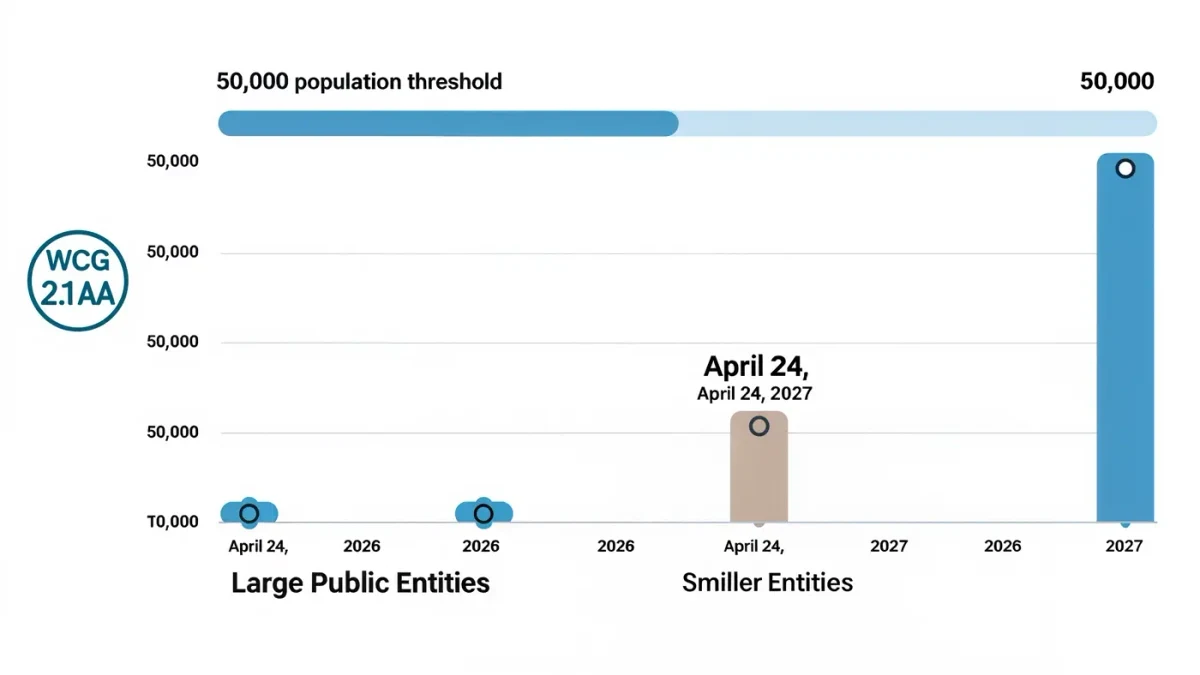
It depends on who you are. Under Section 508 of the Rehabilitation Act, federal agencies and their contractors have been required to meet WCAG-based standards for years. Under the DOJ's 2024 ADA Title II rule, state and local governments must generally conform to WCAG 2.1 Level AA — with compliance dates of April 2026 for larger public entities and April 2027 for smaller ones, and limited exceptions for items like archived documents.
For private businesses, the legal picture is less tidy: the ADA itself never names a technical standard, but plaintiffs and the courts have routinely treated WCAG as the measure of whether a commercial website is accessible, and web accessibility lawsuits have numbered in the thousands annually. Prudent private sites treat AA as the target even where no statute spells it out.
Where should you start if a site fails?
Start with an audit — a page-by-page evaluation against the criteria — and fix the failures that block the most people first: keyboard traps, missing labels, contrast, and the structure of headings. Publish an accessibility statement that names a contact for feedback, because disabled users reporting a barrier are giving free testing. Then re-test after every redesign, since conformance is a property of a living site, not a certificate earned once.
The through-line of WCAG is unglamorous and powerful: accessibility is engineering, with defined thresholds that can be met, tested and broken. For disabled users, each met criterion is a door that opens — and for the teams who build the web, the rulebook has never been easier to find.